> For the complete documentation index, see [llms.txt](https://time-series-features.gitbook.io/catch22/llms.txt). Markdown versions of documentation pages are available by appending `.md` to page URLs; this page is available as [Markdown](https://time-series-features.gitbook.io/catch22/information-about-catch22/feature-descriptions/self-affine-scaling.md).
# Self-affine scaling
Features that capture the properties of long-range correlations in time series.
*catch22* contains two features based on fluctuation analysis, which aim to capture potential long-range correlations in time series, derived from the `SC_FluctAnal` function in [*hctsa*](https://github.com/benfulcher/hctsa). Select one of the cards below to discover more information:
***
Here is a reference for understanding scaling methods: [*Power spectrum and detrended fluctuation analysis: Application to daily temperatures*](https://journals.aps.org/pre/abstract/10.1103/PhysRevE.62.150) Talkner and Weber, *Phys. Rev. E* **62:** 150 (2000).
### Summary of the Method
The main steps of the method are as follows:
1. Compute a cumulative sum of the time series (for `dfa`, of every second value; see below)
2. Compute the level of fluctuation (e.g., root-mean-square deviations from local low-order trends) across windows corresponding to a given timescale. Different methods exist for detrending time-series windows at a given timescale, including (relevant to these two features):
1. Rescaled range analysis computes the range of the detrended points in each window (Caccia et al., Physica A, 1997). In *catch22*, the trend removed is a least-squares line fitted to each window, and the range is not divided by the window's standard deviation (as it would be in a conventional rescaled range statistic). The fluctuation at that timescale is the root-mean-square of the ranges across windows.
2. DFA fits a *k*-order polynomial to each window (linear, *k* = 1, in *catch22*) and computes the root-mean-square of the residuals from this fit across all windows.
3. Looks for linear scaling in the log(timescale)–log(fluctuation) plot.
In *catch22*, fluctuations are computed at up to 50 logarithmically spaced timescales between 5 samples and half the length of the cumulative sum (rounded to the nearest integer, with duplicates removed), using the non-overlapping windows that fit entirely within the series at each timescale.
Some time series exhibit a 'crossover' in their scaling: there are different scaling rules at different ranges of timescales. The two *catch22* features fit straight lines to two distinct scaling regimes in the log–log plot, choosing the split point that minimises the total squared error of the two fits (which share the split point). Each regime must contain at least a quarter of the timescales, and at least 8 of them, which keeps the split away from the ends of the range, where a line through a handful of points fits trivially well. The features return the proportion of the evaluated timescales that fall in the first (shorter-timescale) regime, up to and including the split point, rather than the timescale itself.
The two-regime fit therefore needs at least 16 distinct timescales, which requires a time series of at least 40 samples for `rs_range` and at least 79 samples for `dfa` (as in *hctsa*). For shorter time series (and for a constant time series, which cannot be *z*-scored), both features return 1 by default (with masking), corresponding to a single scaling regime spanning all timescales.
{% hint style="info" %}
**Changes in v1.0**: The names are unchanged, but both features now match *hctsa*'s `SC_FluctAnal` (see the calls in the footnotes), which revised the two-regime fit to remove a bias towards splits at the edges of the search range. Before v1.0:
* each regime had to contain at least 6 timescales, and the split minimised the sum of the two fits' root-sum-of-squares errors (rather than their total squared error);
* timescales ran from 5 samples to half the length of the original time series, so for `dfa` (whose cumulative sum has half as many points) they reached the length of the cumulative sum;
* time series with fewer than 12 distinct timescales returned 0 (and constant time series returned `NaN`).
Values therefore change for most time series, often substantially, and the example outputs below were computed with an earlier version of *catch22*.
{% endhint %}
Note that these features make quite strong assumptions about the data and can be unstable for time series that do not exhibit scaling, or that exhibit a single scaling regime across all timescales.
***
## 1. `rs_range`
### What it does
[`rs_range`](#user-content-fn-1)[^1] uses rescaled range analysis described above to estimate points in logarithmic timescale–fluctuation space.
{% tabs %}
{% tab title="Example 1: AR(2) Process" %}
Time series (the best approximation to two distinct scaling regimes: the first scaling regime is indicated with red markers in the plots below) that change at a short timescale, like this [AR(2) process](https://www.comp-engine.org/#!visualize/8c0fd998-3873-11e8-8680-0242ac120002), receive **low values** of this feature:
### **Feature output: `rs_range = 0.200`**
{% endtab %}
{% tab title="Example 2" %}
This feature gives **high values** for time series where the scaling regime changes at longer timescales:
### **Feature output: `rs_range =`****`0.694`**
{% endtab %}
{% tab title="Example 3: Complex Butterfly Map" %}
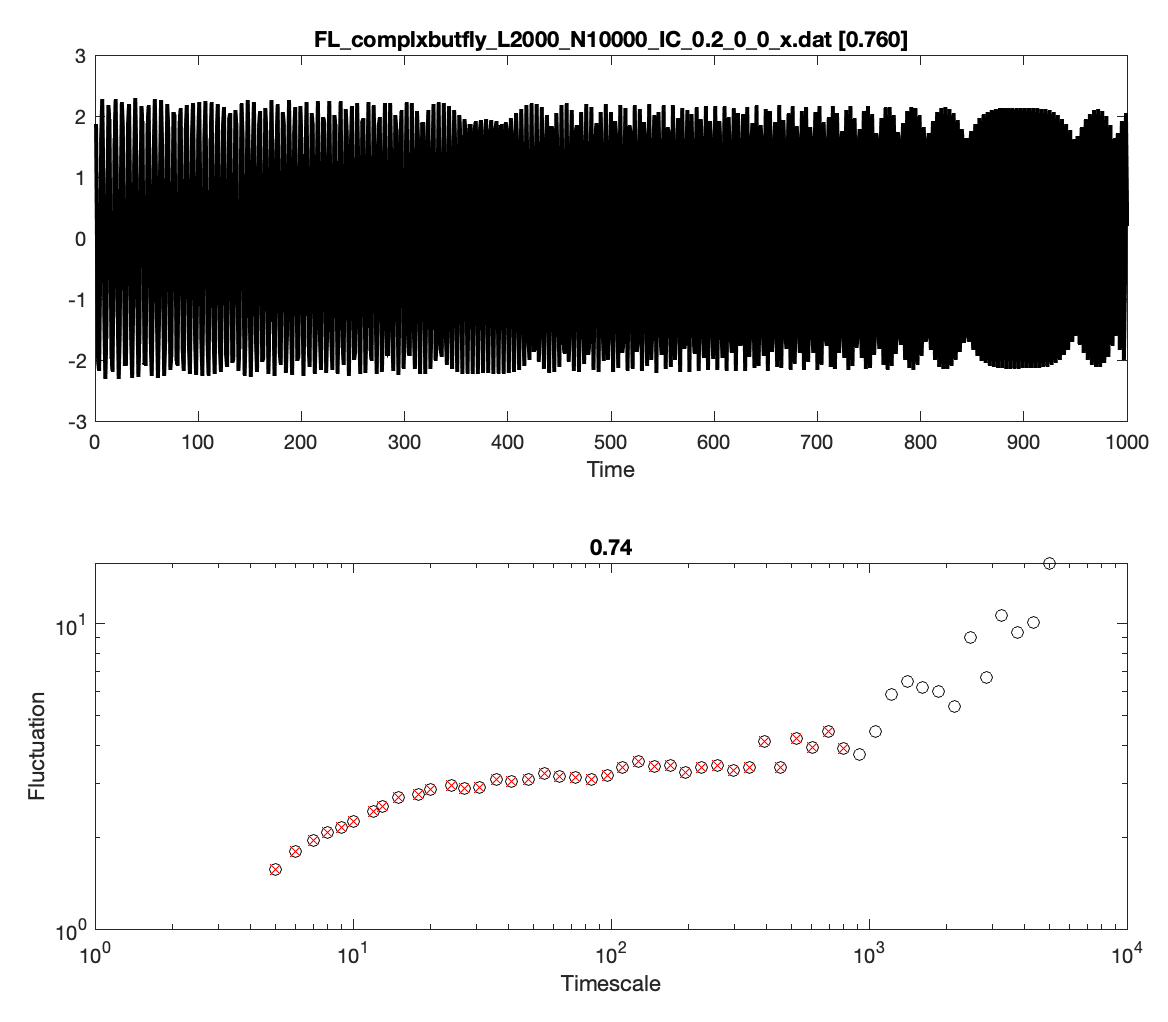
This feature gives **high values** for time series where the scaling regime changes at longer timescales. Consider this [complex butterfly map:](https://www.comp-engine.org/#!visualize/76112226-3871-11e8-8680-0242ac120002)
### **Feature output: `rs_range =`****`0.760`**
{% endtab %}
{% endtabs %}
***
***
## 2. `dfa`
### What it does
[`dfa`](#user-content-fn-2)[^2] measures the same property as above, but from a timescale–fluctuation curve estimated using de-trended fluctuation analysis (DFA), using linear de-trending in each window, after down-sampling the time series by a factor of 2 (taking every second value, so the cumulative sum has ⌈*N*/2⌉ points).
{% tabs %}
{% tab title="Example 1: Duffing-van der Pol Oscillator" %}
It displays qualitatively similar behaviour to`rs_range`, e.g., with **low value** for this [Duffing-van der Pol oscillator](https://www.comp-engine.org/#!visualize/6ec42454-3872-11e8-8680-0242ac120002) (which has a change in the scaling relationship at short timescales):
### **Feature output: `dfa =`****`0.204`**
{% endtab %}
{% tab title="Example 2: Opening Share Price" %}
This feature assigns **higher values** for time series that exhibit strong scaling through to longer timescales, like this log-return series of an [opening share price](https://www.comp-engine.org/#!visualize/b1edede6-3871-11e8-8680-0242ac120002):
### **Feature output: `dfa =`****`0.800`**
{% endtab %}
{% endtabs %}
***
***
[^1]: **Naming info**: Short name `rs_range`; long name `SC_FluctAnal_2_rsrangefit_50_1_logi_prop_r1` (unchanged in v1.0), matching the *hctsa* feature of the same name. Reproduced in *hctsa* by `SC_FluctAnal(x_z,2,'rsrangefit',50,1,[],true).prop_r1`.
[^2]: **Naming info**: Short name `dfa`; long name `SC_FluctAnal_2_dfa_50_1_2_logi_prop_r1` (unchanged in v1.0), matching the *hctsa* feature of the same name. Reproduced in *hctsa* by `SC_FluctAnal(x_z,2,'dfa',50,1,2,true).prop_r1`.
---
# Agent Instructions
This documentation is published with GitBook. GitBook is the documentation platform designed so that both humans and AI agents can read, navigate, and reason over technical content effectively. Learn more at gitbook.com.
## Querying This Documentation
If you need additional information that is not directly available in this page, you can query the documentation by asking a question.
Perform an HTTP GET request on the following URL with the `ask` and `goal` query parameters:
```
GET https://time-series-features.gitbook.io/catch22/information-about-catch22/feature-descriptions/self-affine-scaling.md?ask=&goal=
```
`ask` is the immediate question: it should be specific, self-contained, and written in natural language.
`goal` is what the user is ultimately trying to achieve, the reason they need the answer. Sharing it helps GitBook give you a better, more relevant answer. A goal is most helpful when it describes the outcome the user wants rather than restating the question. For example, with `ask=how do I create an API token`, a goal like `automate deployments from our CI pipeline` lets GitBook tailor the answer to that use case.
The response will contain a direct answer to the question and relevant excerpts and sources from the documentation.
Use this mechanism when the answer is not explicitly present in the current page, you need clarification or additional context, or you want to retrieve related documentation sections.